Skip to product information
1 of 7

DefenderShield

Dual-Sided Stylus Touchscreen Pen

Regular price $13.99 USD
Regular price $13.99 USD Sale price $13.99 USD
Sale Sold out
Shipping calculated at checkout.

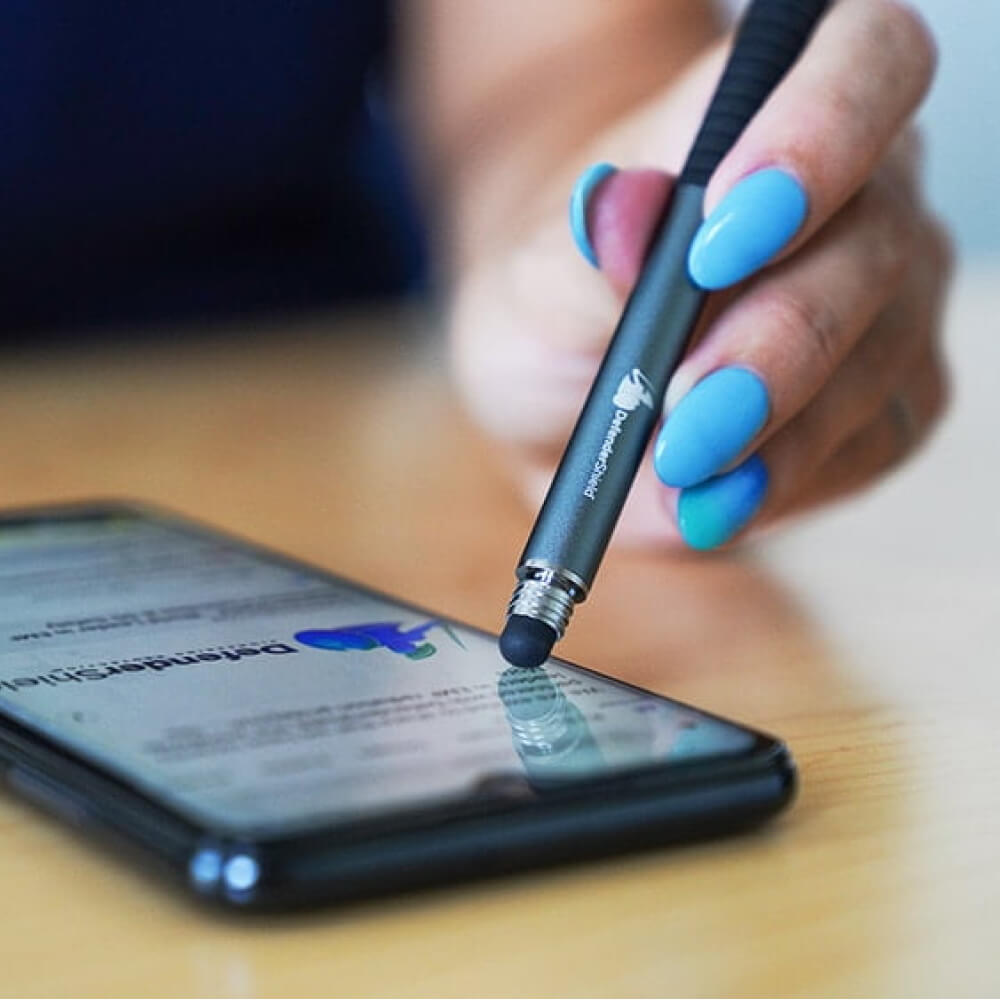
A 2-in-1 stylus pen with two touchscreen tips on opposite ends — a sensitive rubber tip for general navigation and a precision clear disk tip for detailed input. Use it to navigate phones, tablets, and touchscreen laptops without placing your finger directly on the screen. Twist-off cap with finger grip. 5.25” long, 2 oz. Compatible with all capacitive touchscreens.

View full details
Good to know
  This stylus does not contain any EMF shielding material. It does not block, absorb, or redirect EMF radiation. It eliminates direct finger-to-screen contact, creating a small physical gap between your skin and the screen’s surface while you tap, swipe, and type. For EMF shielding, see DefenderShield’s phone cases, laptop shields, and clothing.

Description

Two Tips for Two Tasks

✏️ Rubber Tip for Swiping · Clear Disk Tip for Precision

The rubber tip on one end is soft and responsive — use it for scrolling, swiping, tapping, and general touchscreen navigation on any device. The clear disk tip on the opposite end provides a visible contact point for precise tasks: selecting small interface elements, drawing, signing documents, or tapping links. Twist off the cap to switch between them. Both tips work on all standard capacitive touchscreens including phones, tablets, and touchscreen laptops.

Navigate Without Touching the Screen Directly

📱 A Physical Gap Between Your Finger and the Screen Surface

Every time you tap, scroll, or type on a touchscreen, your fingertip rests directly on the device’s surface. The stylus adds a physical separation — the pen’s tip touches the screen while your hand holds the pen body several inches away. This is particularly relevant during extended screen sessions on tablets and touchscreen laptops, where your fingers would otherwise rest on the display surface for long periods. Pair the stylus with a DefenderShield phone case or laptop shield for combined distance and directional EMF shielding.

How to use

1. Choose your tip. The rubber tip (default, exposed) is ready for general use. For precision tasks, twist off the cap to reveal the clear disk tip on the opposite end.

2. Hold like a pen. Grip the stylus at the textured finger grip area and use it on any capacitive touchscreen — phone, tablet, or laptop.

3. Replace the cap when done. Twist the cap back on to protect the rubber tip during carry and storage.

Care

• Wipe tips with a soft, dry cloth to remove dust and fingerprints.

• Do not press excessively hard — normal touchscreen pressure is sufficient for both tips.

• Replace the stylus if either tip becomes torn, flattened, or unresponsive.

Specifications

Specification

Detail

Product Type

Dual-sided touchscreen stylus (not EMF shielding)

Tip 1

Sensitive rubber tip — general touchscreen navigation

Tip 2

Clear disk tip — precision input and drawing

Cap

Twist-off with textured finger grip

Length

5.25”

Weight

~2 oz (0.125 lbs)

Compatibility

All capacitive touchscreens (phones, tablets, laptops)

EMF Shielding

None — reduces direct finger contact only

HSA / FSA Eligible

Yes — see if you qualify at checkout

Video

  • 5 stars: 19 (90%)
  • 4 stars: 0 (0%)
  • 3 stars: 0 (0%)
  • 2 stars: 1 (5%)
  • 1 star: 1 (5%)
R
Rachelle O.
Great precision

I enjoy using this whilst gaming. It helps.

Hi Rachelle,

Awesome! We're thrilled to hear you're enjoying the great precision while gaming—that's what it's all about! Thanks for taking the time to review!

Warm regards,
The DefenderShield team

C
Carla K.
Touch screen pen

Works when using my iPhone or iPad. Would recommend.

A
Alysha H.
Love it

It's been saving my fingers from the burning and tingling. I love this thing

K
Kenya L.
Dual-Sided Stylus Touch Screen Pen is Wonderful

Excellent product! I'm so glad that I no longer have to touch the screen when texting. That was always a concern.

K
Kristen S.C.
Feels better than touching the screen

When I touch my iPhone with my finger, I actually feel an electric pulse channel up through my finger, arm, and body. I do not feel that when using this pen. I have not tried it with other devices.

A
Andrew P.
Love the touch screen pen

Easy to use

M
Mary E.R.
Best Stylus Ever!

Well made stylus, great functional product.
I highly recommend it!

A
Amelia S.
Great screen pen

Convenient

M
Marianne W.
Pen is a must when you also buy the phone case

I also bought a protective case for my phone, which prevents my normal stylefrom working properly. This pen does work in combination with the phone case.

The phone case however is less good for emf protection. Especially whilst using the phone. And isn't that when we need the protection most?!

E
Estelle V.
Dual-Sided Stylus Touch Screen Pen.

Fantastic product, many thanks.

T
Tom B.
Handy item for use with iPAD & IPHONE

Excellent!

H
Helene R.
Awesome pen!

Great! Love it!

J
Janice R.
A Great Bargain

Fabulous help. My fingers are now healing from the awful EMFs. The price was perfect. I’m very thankful for this stylus !!

g
geoff
I like it

The stylus is fine, and the pen tip works great. The stylus end does come loose with typing, which is odd, but screws in easily. So much nicer than signing with my finger!

L
Leela

The rubber tip doesn't work well for me because I have to press down pretty hard for it to work. I use the clear disk side exclusively. Except I dropped it on the floor and the tip came off. Now it's useless, and I got this in December, that is about 8 months. Didn't last long.

Hello Leela, Thank you for your feedback. We apologize for the experience you are describing but we are proud to offer a 1 Year Warranty policy on all of our products. We invite you to please complete the Warranty Replacement Form located on our website for replacement consideration by our warranty department. Please be sure to complete all fields marked with a red asterisk or the form will not be submitted and please be sure to attach a clear photo illustrating the issue. https://www.defendershield.com/warranty Best, The DefenderShield Team

S
Sharon W.
Nice

It works better than a few others I have had. Seems more durable as well.

M
Margaret G.
Excellent product

Excellent

L
Laura H.
Returned item

This was not what I thought it was going to be. I thought it was a pen and stylus combo.

Hello Lauren,

Thank you for contacting us. We are very sorry to hear about the confusion with our product. Our Dual Sided Stylus Touch Screen Pen's main function is to avoid touching the screen of your EMF-emitting devices only. We work to uphold the highest standard of quality and shielding in our products to protect you and your loved ones, we look forward to servicing you in the future.

Best Regards
The DefenderShield Team

D
Denise S.
this is very unique pen I have

I tried to use and it is convenience to use the touch screen pen. it is different and easy to use it

K
Kathleen D.
Touch Screen Pen- five ⭐️ ⭐️⭐️⭐️⭐️

Love my Touch Screen Pen it’s another superior product. I’d be lost without it. 😎

L
Lynette T.
Easy and useful

Easy to use, easy to get used to. I like not having to touch my screen as much, especially if I'm writing a long email (or a short review).

FREQUENTLY ASKED QUESTIONS

Dual-Sided Stylus Touchscreen Pen FAQ

No. The stylus does not contain any shielding material. It reduces direct finger-to-screen contact by placing the pen’s tip on the screen instead of your fingertip. For actual EMF shielding, see DefenderShield’s phone cases, laptop shields, and clothing.

All capacitive touchscreens. That includes iPhones, iPads, Android phones and tablets, touchscreen laptops, and other devices with standard capacitive displays. It does not work with resistive touchscreens (found in some older devices and specialized equipment).

The rubber tip is soft and broad — best for scrolling, swiping, and tapping. The clear disk tip has a small transparent circle that shows exactly where you’re touching — best for precision tasks like selecting small buttons, drawing, or signing.

No. Both tips are passive — they work by conducting the electrical charge from your hand through the pen body to the screen. No batteries, no Bluetooth, no charging.

COMPLETE YOUR EMF PROTECTION

Customers Who Bought This Also Ordered

Designed by a Telecom Engineer.

DefenderShield was founded by Daniel T. DeBaun, a 30-year veteran of the telecommunications industry. Every product is engineered using shielding principles from military and industrial EMF protection, adapted for consumer devices.

Read the full DefenderShield story