


DefenderShield
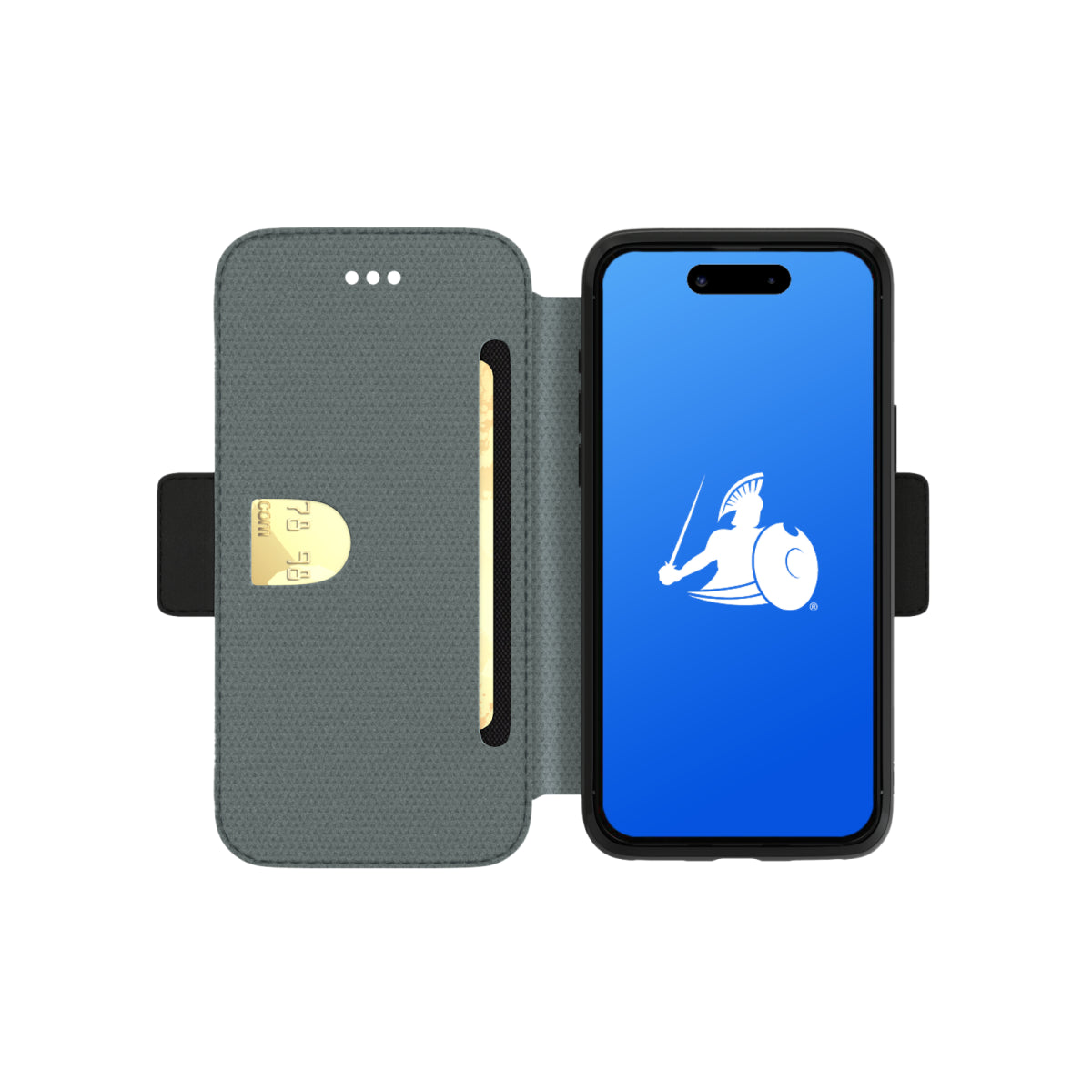
iPhone 15 EMF Blocking Wallet Case with 5G Radiation Protection
Regular price
$31.99 USD
Regular price
$83.99 USD
Sale price
$31.99 USD
Unit price
per
Shipping calculated at checkout.


iPhone Cases FAQ
iPhone 15 EMF Blocking Wallet Case with 5G Radiation Protection
Does the case block EMF radiation all the time, or only when the cover is closed?
The shielding is active only when the front cover is positioned between your body and the phone. The Ultra Armor+® shielding layer is built into the front cover. When the cover is directlyagainst your body — in a pocket, against your ear, or resting on your lap — it creates a barrier that blocks up to 99% of RF and ELF radiation from your phone at the point of contact. This is a directional design, not a sealed enclosure — it protects the side of the phone facing you, while allowing full connectivity from the back and sides.
Will this case affect my phone’s signal, call quality, or battery life?
No — your cellular signal, WiFi, Bluetooth, GPS, and all wireless connections remain fully functional. The shielding is directional: it reduces the radiation passing through the front cover toward your body, not the signal reaching the phone’s antenna on the back and sides. Call quality, download speeds, and battery performance are unaffected. Your phone continues to operate exactly as it does with any standard case.
What is the difference between RF and ELF, and does this case block both?
Yes — this is one of the key differentiators of the DefenderShield iPhone 17 Wallet Case. RF (Radio Frequency) radiation is emitted by your phone’s wireless connections: cellular, WiFi, Bluetooth, GPS, NFC, and 5G. ELF (Extremely Low Frequency) radiation is emitted by the phone’s battery and internal circuitry. Most phone cases that claim EMF protection address RF only, and not even the full spectrum of higher, newer RF frequencies. The Ultra Armor+® shielding in the front cover blocks both — from 0 Hz (ELF) through 110 GHz (5G mmWave) — making it comprehensive across the full electromagnetic spectrum relevant to smartphone emissions.
Does this case block 5G radiation?
Yes — the Ultra Armor+® shielding covers all three 5G bands: low-band (below 1 GHz), mid-band/C-band (up to 6 GHz), and high-band millimeter wave (24 GHz and above, tested up to 110 GHz). Many competing EMF phone cases address only low-band 5G. The DefenderShield case shielding is independently tested to perform across the full 0–110 GHz range, which includes every current and near-future 5G deployment band.
Can I use the case as a wallet and leave my regular wallet at home?
Yes — the case is designed to function as a daily wallet replacement. Three RFID-blocking card slots hold credit cards, debit cards, IDs, or other cards and cash securely. The magnetic tab closure keeps cards and phone enclosed. The included wrist strap provides a clutch-style carrying option. For most daily errands, travel, and commuting, the wallet case carries everything you need without a separate wallet.
How does the detachable magnetic nesting work?
The inner anti-shock nesting separates from the wallet cover magnetically. When attached, the nesting holds your phone inside the full wallet case with drop protection, card slots, and the shielded front cover. When detached, the nesting functions as a slim standalone case — ideal for mounting on a DefenderShield Magnetic Car Phone Mount or for lighter pocket carry. Snap the wallet cover back on when you need your cards, wristlet, and EMF shielding again. No tools or clips needed — the magnets align and hold securely.
What makes this different from cheaper EMF phone cases?
Four specific, verifiable differences: 1. Full-spectrum shielding (0–110 GHz): the DefenderShield case blocks RF, all three 5G bands, and ELF battery emissions. Most budget EMF cases cover a narrow RF band and skip ELF entirely. 2. FCC-accredited independent lab testing: shielding performance is verified and published, not self-reported. 3. Wallet functionality with RFID blocking: three RFID-blocking card slots, wrist strap, foldable stand, and magnetic tab closure — features that other EMF-only cases do not include. 4. Detachable magnetic nesting: separates for slim carry and car-mount compatibility, while competitors use a fixed, non-separable construction. 5. Quality materials for long-lasting durability: RFID pockets that don’t easily stretch out, and higher quality nesting and front cover components ensure your phone case lasts as long as your phone. Backed by a 1-year manufacturer warranty and 30-day full-refund returns — versus the 30–90-day warranty and restrictive return policies typical of budget alternatives
Does this case work with wireless charging?
Wireless charging is not recommended with this case. The metal-plated back of the nesting can interfere with wireless charging pads. For reliable charging, use a wired USB-C cable. If wireless charging is essential, remove the phone from the nesting before placing on the charger.
Is the shielding the same technology used in DefenderShield’s Faraday bags?
The phone case uses Ultra Armor+®, which is related to but different from the Ultra Armor® used in Faraday bags. Both use multi-layer metallic composite shielding. The difference is intent: a Faraday bag seals the device completely inside a conductive enclosure, blocking all signals in and out. The phone case applies shielding directionally through the front cover only, so your phone stays connected while reducing the radiation that reaches your body. Ultra Armor+® adds ELF shielding on top of the RF protection — a layer the standard Ultra Armor® Faraday line does not include to allow for more flexibility.
I already use a phone case — why should I switch to this one?
A standard phone case protects your phone. This case also protects you. Every standard case — silicone, hard shell, or leather — shields the device from scratches and drops but does nothing about the EMF radiation your phone emits during every call, text, and browsing session. The DefenderShield Wallet Case adds a layer of independently tested EMF shielding at the point where the phone contacts your body. It also replaces a separate wallet with RFID-blocking card slots, adds a wristlet and a landscape stand, and uses a detachable magnetic design for car-mount compatibility. It does more than the case you already have — without requiring any change in how you use your phone.
Phone Cases Reviews and Testimonials
Complete Your EMF Protection Setup
-
EMF Radiation-Free Earbuds Air Tube Stereo Headphones
Regular price From $79.99 USDRegular priceUnit price per -
EMF Radiation-Free Air Tube Over-Ear Headphones
Regular price $195.99 USDRegular priceUnit price per -
iPhone 16 EMF Blocking Wallet Case with 5G Radiation Protection
Regular price From $79.99 USDRegular priceUnit price per$83.99 USDSale price From $79.99 USDSale -
DefenderPad Laptop EMF Radiation + Heat Shield
Regular price From $104.99 USDRegular priceUnit price per$154.99 USDSale price From $104.99 USDSale


